Sunday, January 26, 2020

Machine learning


Machine Learning

Image result for machine learning stock photo

What is Machine learning?

Technology is advancing at a very high rate in today's world, we have used it to create things that can help us learn new things and to satisfy our needs. Now, let's take it to the next step by making our machines more sophisticated. Usually we have to tell a machine to perform a task, but what if we could make it execute that task on its own? 

Machine learning is the scientific study of algorithms that a computed uses to perform a specific task without requiring instructions. It relies on patterns and inference to perform. The computer in machine learning uses a mathematical model to analyze data to make predictions without having to be asked to perform such action and it is also a form of artificial Intelligence or AI for short. In other words, its a computer that works independently, like all the robots you see in movies about science fiction. 

What is AI?

In computer sciences, AI or Artificial Intelligence is intelligence demonstrated by a machine or computer and it is compared to human intelligence. It also the study of intelligent agents any device that perceives its environment and takes actions that maximize its chance of successfully achieving its goals or completing its tasks. the term artificial intelligence is often used to describe machines that mimic cognitive functions that humans associate with the human mind in things such as learning and problem solving.

We have different types of AI called strong AI and weak AI. Weak AI are the types of AI that work more like an assistant or task manager. Google assistant is an example of weak AI it works to manage your schedule, set up reminders, control the lights on the living room. It is designed to deal with the mundane tasks of our lives. Now, strong AI is something out of science fiction. Strong AI is the type of AI that can perfectly replicate how the human brain is. It is unfortunate that we have not reached these type of technology because to fully perfect it we have to understand how the brain works.

Deep Learning

Deep learning is an artificial intelligence function that imitates the works of the human brain in processing data and creating patterns for use on decision making. Deep learning is a sub-set of machine learning in artificial intelligence that has networks capable of learning unsupervised from data that is unstructured or unlabeled. It is also known as deep neural learning or deep neural network.

Deep learning has evolved hand-in-hand with the digital era and has brought an explosion of data in all forms and from every region of the world. This data, known simply as big data, is drawn from sources like social media, internet search engines, electronic commerce platforms, and online cinemas. This amount of data is accessible and can be shared through applications like cloud computing.

Labeled and Unlabeled Data

Labeled data is a group of samples that have been tagged with more than one label. Labeling typically takes a set of unlabeled data and augments each piece of unlabeled data with meaningful tags that are informative. Unlabeled data is consists of data that is either taken from nature or created by human to explore the scientific patterns in it. For example, unlabeled data can include photos, audio recordings, videos, news articles, and tweets.

Uses for machine learning

  • Image Recognition: Implementing machine learning into image recognition involves making a computer learn, through a learning model, the different key features of an image. Some examples of its uses are pattern recognition, face detection, face recognition and optical character recognition.
  • Sentiment Analysis: Implementing machine learning into Sentiment Analysis is a process of determining the opinion or attitude of a speaker or a writer in the tone they use to express themselves.
  • News Classification: Using machine learning for News Classification lets us determine what type of content a user is asking to see. It's like telling a computer to give me the sports channel without telling it to give me the sports channel.
  • Information Retrieval: It is the process of extracting structured data from the unstructured data.
  • Medical Services:  Machine learning methods, tools are used extensively in the area of the medical-related problem. For Example: As an instance to detect a disease, therapy planning, medical-related research, prediction of the disease situation. Using machine learning software in the healthcare brings a breakthrough in medical science.
  • Social Media: Using the machine learning approach, social media can create attractive features, giving recommendations, reactions, topics of interest for the users.
  • Predictions: Prediction is the process of saying something based on past history. Examples can be weather prediction, traffic prediction, stock market and more. 

Learning Algorithms

Machine learning has several learning methods, it's main methods are: Supervised Learning, Unsupervised learning, Semi-supervised learning and reinforcement. It collects input which is data collected from a source and it produces an output that is the result of the data input. Machine learning models require a lot of data in order for them to do well. In order to train a machine using a learning model, one needs to collect representative sample of data from a training set. Data from the training then can be set in varied like texts, a collection of images, and data collected from individual users of a service.

  • Supervised Learning: Algorithms are learned from data provided from humans and both the input and the output data are already known to the machine. It experiments with the input and compares its output with the expected output and is able to know whether or not it needs to modify algorithms to match that same expected output. This way of learning can be useful when a future outcome is expected based on specific patterns from the input data.
  • Unsupervised Learning: Algorithms are given raw unlabeled data where the output is unknown. With raw input being provided, the program needs to be able to come up with ways to use it and categorize it. Then, the program studies the input every time and eventually learns how to use it in order to find hidden and complex patterns. 
  • Semi-supervised learning: This method falls in between into Unsupervised and Supervised learning, using supervised learning to make better predictions and come up with better patterns. Facial recognition is a good example of Semi-supervised learning. 
  • Reinforcement: The program is exposed to many sets of data that and based on that exposure it comes with a solution. Reinforcement learning is dependent since it makes decisions sequentially so all later input data depends on the previous output. In reinforcement learning, we have components called agent and reward. The agent is the decision maker and is supposed to come up with the best way to get to the reward, that is the most desired outcome. Reinforcement is used in robotics, navigation, industrial automation, creation of training systems, and gaming.

Importance of Machine learning

Due to its global demand companies are using machine learning to increase their productivity. Task that would otherwise take most likely an hour to complete are done in seconds thanks to automation. Car factories around the world use robotics with learning modules to perform tasks that would take an entire team to complete. Another example is the email automation, massive amounts of marketing emails are sent daily to user in order to inform them about their products or services and its completely done by a computer. Self-driving cars are becoming more of a reality than science fiction but, we should also see the down side of automating jobs.

Morals of Machine Learning

One of the questions asked about automation is: Is it morally correct for a machine to take the job of a human? The field of AI was created under the assumption that human intelligence could be replicated into a machine, however, there is mixed feelings about this topic. This raises philosophical arguments about the nature of the mind and the ethics of creating artificial minds endowed with human intelligence. AI has been seen as fiction for the most part until recent days, the fact that we can trade human mistakes for efficiency will lead to a risk of mass-unemployment. In the end, Machine learning has been applied to a lot of things in our daily life.

In the end...

Machine learning involves several training techniques that a machine uses to perform tasks in a  similar or superior ways to the human brain. There are a lot of things to take into account when it comes to the performance of a learning machine. These include the type of data that’s being used The methods applied: supervised, unsupervised, semi-supervised. Also, the algorithms that follow those learning methods and the math behind it. The way we incorporate machine learning into our lives is also important and has made our way of life easier. It is as if all the things we see in science fiction are now becoming a reality. Machine learning has its ups and down but it is something that will define the future of technology.

References

Wednesday, January 15, 2020

Object Oriented Programming

Object Oriented Programming


What is Object Oriented Programming?

Object Oriented Programming or OPP for short is a programming paradigm based on the concept of objects that contain data in the form of fields. The concept utilized in python for this type of programming revolves around the concept of encapsulating data inside data and being able to treat a collection of things as one individual thing. Computer programs are designed by making them out of objects that interact with one another. The OOP languages are diverse and the most popular ones are class-based, meaning that objects are instances of classes that also determine their types.

What is id and Types?

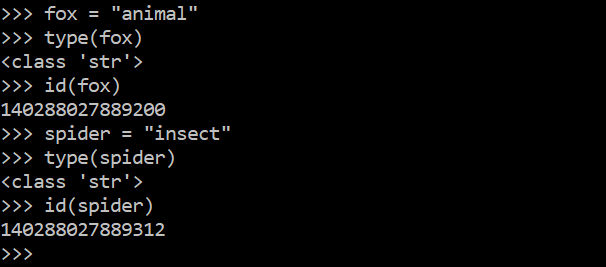
All objects contain a unique id where the object is stored in memory, and we can compare different variable ids in order to identify what data type an object is. The "type()" function will tell us what data type an object is.
For example: 


We can also determine if an object is mutable and immutable by its id.


Immutable Objects

Immutable objects are that cannot be changed after they are created. Examples of immutable objects are: integers, floats, bool, string, unicode, tuple.


In this example we assigned a value to "animal" to the string fox and "insect" to the string spider.
What will happen if we tried to changed them? Let's find out!


We can tell it’s a different object because the id’s are different. This means that we have created a new object! By changing the value of the string fox and the string spider we ended up creating 2 new objects. We can't change the value of these types of object but it is possible to assign a new value to it.

Mutable Objects:

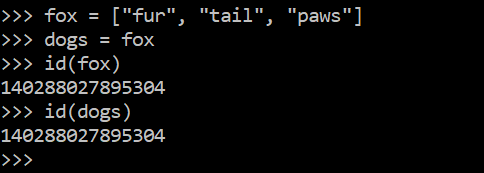
Mutable objects are objects who's values can be changed without altering its id in memory.
Examples of Mutable objects are: Lists, sets and dictionaries.


In this example "fox" is mutable object and we set dogs to point to fox in memory and that is why they have the same id. 

How does python handle mutable and immutable objects?

Data types are treated differently whether or not they can change their identity or their id. Mutable objects can change and add their values without altering its id in memory. On the opposite side,  immutable objects can't keep their original id if then change their values. Understanding how these objects work can be helpful on deciding what data type to assign to any object. 

Arguments and Objects

In Python, arguments take objects as parameters for reference. If we pass  a mutable object to a method, we are passing a reference to this object so we can freely modify its value. However,  if we decide to pass an immutable object as a parameter, we can’t change the value of the object. For example:


In this example we are trying to change the content of the list with types of animals by appending another value to it. We can do this because the we are passing a mutable object as an argument.


In this example, we are trying to increment the value of "number". However since we are passing an immutable object and modifying the function without returning the value. The integer is passed but when we try and print it the value stays the same.


Monday, December 16, 2019

C Programming Dynamic Library

Dynamic Library


What is a Dynamic Library?

Dynamic libraries consist of separate files containing separate pieces of object code. To form a single piece of object code these files are dynamically linked together. Also, dynamic libraries contain extra information that the operating system will require to link the library to other programs in the system.
for more information on static libraries check out my previous blog at https://howtols.blogspot.com/2019/10/c-programming-static-library.html

Why should we use them?

Only one copy of the shared library is kept in memory, making it much faster to compile programs and significantly reducing the size of the executable program also, its load time will be reduced if the shared library code is already present in memory.

A disadvantage compared to a static library is that dynamic libraries have a slower execution time compared to static libraries and potential compatibility issues if a library is changed without recompiling the library into memory.

How to create a dynamic library?

Okay, suppose we have a directory full of files written in c like this:


After we created out files we will compile them using the (GCC) command on the command prompt. 
The GNU Compiler Collection or GCC) is a compiler system produced by the GNU Project supporting various programming languages. For more information on how to use gcc, type the command (man gcc) in your command prompt or terminal. This information is also mentioned in my Static Libraries blog.

next step is to compile all the c files into object files with this line: gcc -fPIC -c *.c


Now that we have made our c files into object files we type this command: gcc *.o -shared -o liball.so

We are telling our computer to compile all the obeject files onto a Dynamic Library. Using the (-shared) flag will make the library dynamic and the naming convention for dynamic libraries is such that each shared library name must start with (lib) and end with (.so).

And it looks like this:


And finally we end up using the command : 
(export LD_LIBRARY_PATH=$PWD:$LD_LIBRARY_PATH)
You can see the result of this code by using the (printenv) command in the command line.

Sunday, November 24, 2019

What happens when ls-l is executed?

What happens when ls-l is executed in your command line?


Before we dive into what this Unix command do, lets first find out what the shell is. The shell is a command line interpreter or also known as "shell",  that provides a command line user interface for Unix operating systems. The shell is an interactive command language and a scripting language, used by operating systems to control execution of shell scripts. Think of the shell as you would normally interact with a Windows or MAC, the only difference being that instead of clicking and scrolling to navigate around, you use commands to do the same thing. The simplest way to describe shell is, a program that employs commands.
Now you are probably wondering, what is a shell script? well, a shell script is a program designed to be run using a Unix like operation system. The uses for a shell script are file manipulation, program execution, and printing text. The term is also used more generally to mean the automated mode of running an operating system shell.
This is what it looks like 


There are different types of shell. For example: 

  • The KornShell (ksh).
  • The Bourne Shell (sh, and oldest shell in use).
  • C Shell (csh).
  • Bash (bash).
  • Remote Shell (rsh).
  • Secure Shell (ssh).
  • Almquist Shell (ash).
  • Power Shell (msh).
  • Z Shell (zsh).
If you want to know more information about these types of shell, use google!


Differences between a Graphic user interface and a command user interface.


As we explained earlier, the main difference between a Graphic User Interface and a Command User Interface is the fact that with one you use the mouse and keyboard to navigate in your computer and the other one uses a command prompt where you will input commands to navigate. 

They look like this: 
 
On the left is a visual way of interacting with a computer using items such as windows, icons, and menus, used by most modern operating systems, and on the right we use commands to interact and navigate withing the system in your computer. Visually interacting with windows involve clicking on a folder to open it, while on the command line we use the command ls to display all files in the working directory. 

Inside the Shell

Now that we know how the shell works, lets take a look on how it makes commands and processes happen. As the user, every time you type a command , you hit the enter key. This will tell your computer that an action is being processed and then the computer returns in the output the result of the command you entered. For example: 

When you type the ls command in your terminal, the system will look for it in all its archives until it finds it and then returns an output that displays all files in your working directory. Like this:


But that is not all there is to it. When we type ls with the option -l the system recognize it like this 
ls -l\n. The \n represent a new line in the command line. The system then will replace the \n with a \0 which represents a NULL terminator for the command. This lets the system know where the command ends and how many of them there are. Then the system uses the function strtok() to parse  the command line and  to an array of strings and separating ls and -l into individual strings. Last both of the strings will be concatenated for execution. 

THE PATH 

But how does it find where this command is located or even what it is? The answer lies in PATH.
PATH is an environmental variable that tells the shell in which directories to look for executable files in response to a command input by the user.  Most commands users will enter when operating a shell exist within PATH. First the computer will look if the entered command is a built-in or an alias, if the command is not either of those then it will look into PATH for an executable. 

PATH looks like this: 

PATH=/usr/local/sbin:/usr/local/bin:/usr/sbin:/usr/bin:/sbin:/bin:/usr/games:/usr/local/games

The directories above contain most of the command you would normally use when interacting with the shell. You may have noticed that all the directories are separated by a ":", more on that in a bit. When we execute the command ls we are looking into the /bin/ls and that will be its full PATH.
Now that we know where to find ls, how do get there? The system takes these steps.

Step 1: The system loops through all the Environmental variables until we find PATH.
Image result for environmental variables in shell

Step 2: The system uses strtok() to look for ":" and then separate each directory into an array of strings.

Step 3: The system concatenates ls to each of the directories until we hit /bin/ls.

That's it!

Now that we have the full PATH we can attach the -l option to it and execute them all together and then the system returns this output:

Once the process is finished we return to the command prompt that waits for the next command form the user input.


By: Andres Cheung & Nicholas Uchida.


Sunday, October 13, 2019

C Programming Static Library

Static Library 

What is static library?

In the C programming language, a static library is a compiled object file containing all symbols required by the main program to operate as opposed to having to pull in separate entities. Static libraries are either merged with other static libraries and object files during building/linking to form a single executable or loaded at run-time into the address space of their corresponding executable at a static memory offset determined at compile-time/link-time.

Why should we use a static library?

There are several advantages to statically linking libraries with an executable instead of dynamically linking them. The most significant advantage is that the application can be certain that all its libraries are present and that they are the correct version. This avoids dependency problems. Static linking can also allow the application to be contained in a single executable file, simplifying distribution and installation.

With static linking, it is enough to include those parts of the library that are directly and indirectly referenced by the target executable or target library. With dynamic libraries, the entire library is loaded, as it is not known in advance which functions will be invoked by applications depending on the structure of the library.

How to create and use a static library

In order to create a static library first we need to access a terminal or command prompt(Terminal is used in MacOS operating systems while the command prompt is used by Windows Operating systems). After we access the command prompt or Terminal we should create some files written in the C programming language.

We can either use the text editors Emacs, Vim, or Vi, but in this case we will use Emacs.


After we created out files we will compile them using the (GCC) command on the command prompt. 
The GNU Compiler Collection or GCC) is a compiler system produced by the GNU Project supporting various programming languages. For more information on how to use gcc, type the command (man gcc) in your command prompt or terminal.


When we use the gcc command we used the option "-c" accompanied by a wild card "*.c". We use this option when we what to compile files but not link them and the wild card to make sure all files that end with the extension .c end up being compiled. This will create object files or files with the extension ".o".

Next step is  to use the "ar"command. The ar command creates, modifies, and extracts from archives. An archive is a single file holding a collection of other files in a structure that makes it possible to retrieve the original individual files.


The "ar" command with the option -r will insert the files member into the archive and the option -c will create the archive, in this case we will call it "libholberton" with the extension ".a" for an archive. And finally using the wildcard  "*.o" to select all object files. 

Whenever files are added to a library, including the initial creation of the library , the library needs to be indexed, which is done with the command "ranlib". The ranlib makes a header in the library with the symbols of the object file contents.This helps the compiler to quickly reference symbols. A large library may have thousands of symbols meaning an index can significantly speed up finding references. For more information use the "man ranlib" command.


Next, if we want to see the contents of our archive we use the "ar" command the with option "-t". 


We have now created a static library "libholberton.a" and now let us use the static library by invoking it as part of the compilation and linking process when creating an executable program.


Our "main.c" file contains a quote from Kevin Mitnick, and we will include this file when we compile our program with the "libholberton.a" library. finally we use the option "-L" that will specifies the path to the library. The executable file should be named quote.


Making a bash script to create a static library

Now that we have created out library, how about we do all the above in a single command. We will use a Bash script to combine all previous steps to a single command. A  Bash script is a plain text file which contains a series of commands.

First step is to create a text file that we will call "create_static_lib.sh" using the Emacs text editor. 


After that we add the "#!/bin/bash" command at the very beginning of our text file. Then we proceed to a add each previous command to create a static library one after the other on a new line like this: 

  1. The command "gcc -c *.c" will compile all file with extension ".c" into object files.
  2. The command "ar -rc liball.a *.o" will create our new library with all object files inside.
  3. The command "ranlib liball.a" will index our library.
Finally make sure that you make the file executable by using the command "chmod u+x create_static_lib.sh" so that all users in your computer can run the program. Type "man chmod" in your command prompt or terminal for more information.

That's it! we have successfully created a program that will create a static library.


Wednesday, September 18, 2019

gcc and what to do

What happens when you run gcc main.c?

What is gcc?

First to start thing we need to know what gcc is. The GNU Compiler Collection (GCC) is a compiler system produced by the GNU Project supporting various programming languages. GCC is a key component of the GNU toolchain and the standard compiler for most projects related to GNU and Linux, including the Linux kernel.

The Free Software Foundation (FSF) distributes GCC under the GNU General Public License (GNU GPL). GCC has played an important role in the growth of free software, as both a tool and an example.

For more information about gcc visit: https://en.m.wikipedia.org/wiki/GNU_Compiler_Collection

What is the C programming language?

C is a general-purpose, procedural computer programming language supporting structured programming, lexical variable scope, and recursion, while a static type system prevents unintended operations. 

By design, C provides constructs that map efficiently to typical machine instructions and has found lasting use in applications previously coded in assembly language. Such applications include operating systems and various application software for computers, from supercomputers to embedded systems.

For more information about C visit: https://en.wikipedia.org/wiki/C_(programming_language)

Steps on how to use gcc

  • First step is to open your Terminal/Command prompt.
  • create a file using the C programming language, the file must have the format .c at the end of its name.
  • now this c file will have a program that will print: Hello, World! but for that to happen we need to compile said file in order to present the output. We use the command gcc in order to compile the main.c file.
  •  What gcc will do is to make the main.c file executable so it will print the text Hello, World!
  • Now that we have compiled our file we can now execute it using this command: ./a-out .
Now that we have executed our main.c file we have printed the words Hello, World! The gcc command will compile files on C programming language and will make those executable to run in your Terminal/ Command prompt.


Monday, September 16, 2019

Symbolic and Hard Links

Symbolic and Hard links on Linux

What is a hard link?
A hard link is merely an additional name for existing file on Linux and other Unix-like operating systems. Any number of hard links, and thus any number of names can be created for any file. Hard links may also be created for other hard links but they cannot be created for directories and also cannot cross filesystem boundaries.

What is a symbolic link?
A symbolic link is a file that links to another file or directory using its path. In Linux and Unix symbolic links are created with the 'ln' command, and in the Windows command line, symbolic links are created using the 'mklink' command. 

Now what is the difference?
  • Symbolic links , unlike hard links, can link to any file or directory on any computer.
  • In a hardlink you can use any of the hardlink names created to execute a program or script in the same manner as the original name given.
  • A hard link preserves the contents of the file.
  • A soft link does not contain the data in the target file.
Here we use the 'ln' command to make a hard link to the file called file1.
Now we use the command 'ls -i' to view the link.
If you look at the file1 and the hlink1 you can view the inode on the left side is the same. As you can see,  hardlinks act as a shortcut to that file that is hard linked.

Now lets look at Symbolic links.
Using the command 'ln -s' will create a symbolic link between files.
Now we use the 'ls -i' to view the link. 

Notice that only the hardlink file has the same inode as the hardlink while the soft link file has different inodes.